Your CEO Just Said "AI Strategy" and You Need Answers by Monday
It’s Wednesday afternoon. Your CEO just forwarded a McKinsey article about AI in supply chain with a one-line note: "What’s our plan here?" You have until Monday’s leadership meeting to sound like you know what you’re talking about. And ideally, you’d like to actually know what you’re talking about.
Here’s the good news: the best AI education in the world is completely free. Not "free trial with a credit card on file" free. Not "free but the useful stuff costs $499" free. Actually free.
Why? Because an informed user is a paying customer. The major AI companies would rather you learn on their platform than a competitor’s.
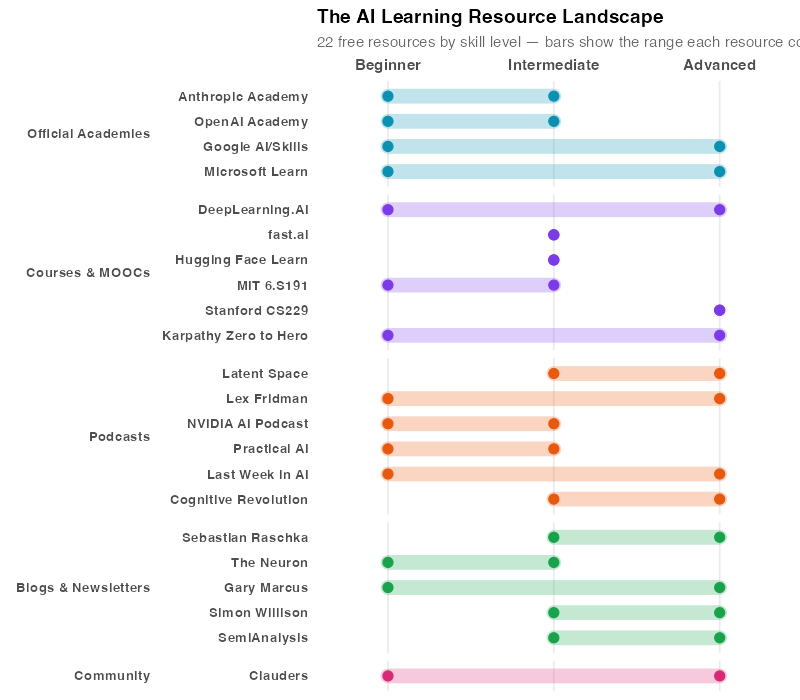
But before you can write the strategy deck, you need to understand the landscape — and that starts with your own AI education. Here’s the bad news: there are now so many free resources that finding the right ones is its own full-time job. What follows is the opinionated shortlist — 29 resources organized by how you like to learn, with honest assessments of who each one is actually for.
The Big Four: Official AI Academies
Every major AI company now runs a free learning platform. This is not altruism — it’s customer acquisition disguised as education. But who cares? The content is excellent, and the price is right.
Anthropic Academy
URL: anthropic.skilljar.com | Also on GitHub
Anthropic’s academy is the one I’d recommend starting with if you’re a supply chain professional who wants to use AI rather than build AI from scratch. Twelve-plus courses across three tracks: Build with Claude (for developers), Claude for Work (for business users), and Claude for Personal (for everyone).
Why it stands out: The courses are practical to an almost aggressive degree. "Claude 101" gets you productive in under an hour. "Claude Code in Action" is 21 lessons of actual hands-on building. And unlike most vendor academies, the GitHub repository gives you all the course materials — including Jupyter notebooks you can run yourself — so you’re not locked into a clunky LMS interface. Free certificates too, which look better on LinkedIn than you’d expect.
Best for: Anyone who wants to go from "I’ve heard of AI" to "I built something with AI" in a weekend.
OpenAI Academy
URL: academy.openai.com
OpenAI launched their academy in September 2024. By 2025, they expanded it with a headline-grabbing goal: certify 10 million Americans by 2030. The course catalog is organized by role — tracks for educators, nonprofits, small business, and government — which makes it surprisingly easy to find relevant content if you fit one of those buckets.
Why it stands out: The sector-specific tracks are genuinely useful. "ChatGPT Fundamentals" is a solid starting point, and the prompting course is one of the better introductions to getting consistent results from language models. They’re piloting certifications, though those weren’t widely available at the time of writing.
Best for: Business professionals who want structured, role-specific learning paths. If you’re in procurement or operations management, the small business track maps reasonably well to your world.
Google AI / Google Skills
URL: ai.google/learn-ai-skills | grow.google/ai
Google’s offering is, in classic Google fashion, enormous and slightly overwhelming. Nearly 3,000 courses, labs, and credentials. The quality ranges from excellent (Google AI Essentials for beginners, Generative AI Leader for managers) to niche (Cloud AI Infrastructure for DevOps engineers you’ll never meet).
Why it stands out: The sheer breadth is unmatched. If your learning need exists, Google probably has a course for it. The "Google AI Essentials" certificate is a solid beginner credential, and the hands-on labs using Google Cloud are genuinely well-designed.
Best for: People who like having a massive library to browse. If you already use Google Workspace, the AI integration courses are immediately applicable. But be warned: without a clear plan, you’ll spend more time choosing courses than taking them.
Microsoft Learn AI Hub
Microsoft’s approach is the most enterprise-friendly of the four. Free learning paths that ladder up to seven AI certifications (the exams themselves cost money, but all the learning materials are free). The AI Fundamentals path (AI-900) is a legitimate beginner course, and the Copilot Studio courses teach you to build AI assistants for your specific business processes.
Why it stands out: If your company runs on Microsoft 365 — and statistically, it probably does — the Copilot integration courses are immediately actionable. The 2026 AI Challenge gamifies the learning with badges and milestones.
Best for: Supply chain professionals in Microsoft shops. If you’re already in Excel, Power BI, and Dynamics, this is the fastest path from "I use spreadsheets" to "I use AI-powered spreadsheets."
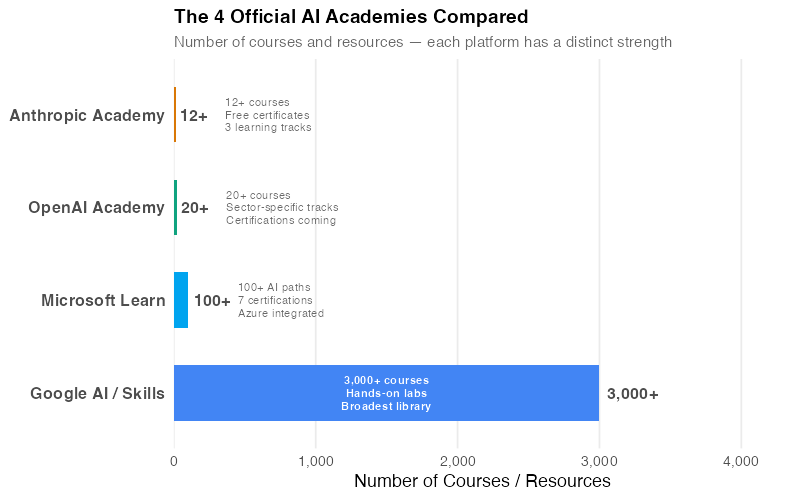
| Academy | Courses | Certificates | Best For | Time to First Win |
|---|---|---|---|---|
| Anthropic Academy | 12+ | Free | Hands-on builders | 1 hour |
| OpenAI Academy | 20+ | Piloting | Role-specific learners | 2 hours |
| Google AI/Skills | 3,000+ | Free & paid | Broad exploration | 3 hours |
| Microsoft Learn | 100+ paths | 7 certs (exam $) | Enterprise / M365 users | 2 hours |
Courses & MOOCs: The Deep Dives
The academies get you started. But once you’ve completed the 101 courses, you’ll have questions they don’t answer — how do neural networks actually work? How do I build my own models? That’s where these courses come in.
If the academies are "learn to drive," these courses are "learn how the engine works." They range from gentle introductions to full-semester university courses. All free, all excellent, and all worth your time if you want to move beyond surface-level understanding.
DeepLearning.AI — Andrew Ng
Andrew Ng is the closest thing AI education has to a household name. His original Stanford course launched in 2011 and essentially kicked off the MOOC revolution. His current platform hosts 150+ programs, but two stand out:
- "AI for Everyone" — a non-technical overview designed for business leaders. No code, no math, just a clear explanation of what AI can and can’t do. Perfect for the CEO who forwarded that McKinsey article.
- "ChatGPT Prompt Engineering for Developers" — 90 minutes of concentrated practical knowledge. If you only have time for one course, this is a strong contender.
The short courses (1-2 hours each) are free. The longer specializations live on Coursera and may require a subscription, but the core content is accessible without paying.
fast.ai — Jeremy Howard
URL: course.fast.ai
If Andrew Ng is the gentle professor, Jeremy Howard is the brilliant friend who grabs your laptop and says "here, let me show you." Fast.ai’s "Practical Deep Learning for Coders" is the world’s longest-running deep learning course, and it follows a radical top-down philosophy: build something that works on day one, then learn the theory behind it.
Their newest course, "How to Solve it With Code" (launched October 2025), takes this even further — teaching you to use AI tools to write code that solves real problems, regardless of your programming background. This is the one I’d recommend for supply chain analysts who know Excel but are intimidated by Python.
100% free. No certificates, no upsells, no catch. Just a New Zealand-based former McKinsey consultant who believes AI education should be as accessible as air.
Hugging Face Learn
URL: huggingface.co/learn
Hugging Face is the GitHub of machine learning models — a community platform where researchers share pre-trained AI models. Their learning hub offers 12 courses covering everything from the LLM Course (how large language models work under the hood) to the AI Agents Course (how to build autonomous AI systems) to a brand-new MCP Course (how to give AI models access to external tools).
Why it matters for supply chain: The AI Agents course is directly relevant to anyone building automated supply chain workflows. Think: an AI agent that monitors your inventory levels, detects anomalies, and drafts reorder recommendations — that’s the kind of system these courses teach you to build.
MIT 6.S191 — Introduction to Deep Learning
MIT’s intro deep learning course, updated annually, is the sweet spot between "for everyone" and "for PhD students." The lectures are clear, the labs run in Google Colab (no setup required), and the pacing assumes you’re smart but not necessarily technical. Updated every year with the latest developments — the 2026 edition covers modern transformer architectures and generative AI.
Andrej Karpathy — Neural Networks: Zero to Hero
URL: YouTube (7 videos) | Plus: "Deep Dive into LLMs" (3.5 hours)
Karpathy is the former head of AI at Tesla and the person who coined the term "vibe coding." His YouTube series builds a neural network from absolute scratch — starting with basic calculus and ending with a working language model. It’s the best resource I’ve found for building genuine intuition about how these systems actually work.
His standalone "Deep Dive into LLMs" video (3.5 hours) is the single best explainer of how ChatGPT-style models are trained, fine-tuned, and deployed. If you watch one thing on this entire list, make it this one.
Stanford CS229 / CS231n
The gold-standard university AI courses. Free older lectures available on YouTube. CS229 (Machine Learning) is Andrew Ng’s original Stanford course — mathematically rigorous and foundational. CS231n (Convolutional Neural Networks for Visual Recognition) is excellent if you work with visual data (quality inspection, warehouse automation). Advanced level — bring your linear algebra.
Podcasts: Learn While You Commute
Courses give you knowledge. Podcasts give you context — the "why now" and "what’s next" that courses can’t keep up with. They’re also the most efficient learning medium for busy professionals because they fit into dead time — your commute, your workout, your grocery run. Here are the six worth subscribing to.
Latent Space — swyx & Alessio Fanelli
URL: latent.space | 174+ episodes
The most technically deep AI podcast that’s still accessible to non-researchers. Swyx (Shawn Wang) is a developer-turned-investor and Alessio Fanelli is a venture capitalist, which gives the show a unique "where does the technology meet the business?" angle. Their newsletter (100K+ subscribers) provides daily AI news roundups that are worth subscribing to independently.
Listen first: Any episode with "State of" in the title for a big-picture overview.
Lex Fridman Podcast
URL: lexfridman.com/podcast | 490+ episodes
Long-form conversations (2-5 hours) with the biggest names in AI, science, and technology. Fridman’s interview style is polarizing — some love the philosophical depth, others wish he’d get to the point — but the guest list is unmatched. His recent episode "State of AI in 2026" with Sebastian Raschka and Nathan Lambert is an excellent current overview.
Listen first: Pick any episode with a guest whose work you use.
NVIDIA AI Podcast — Noah Kravitz
URL: blogs.nvidia.com/ai-podcast | 294+ episodes
NVIDIA makes the chips that power essentially all modern AI. Their podcast focuses on real-world applications — how companies are actually deploying AI in manufacturing, logistics, healthcare, and finance. It’s the most accessible show on this list, designed for professionals who want to understand what AI does without needing to understand how it works.
Listen first: Any episode about manufacturing or logistics — they’re directly relevant to supply chain.
Practical AI — Daniel Whitenack & Chris Benson
URL: practicalai.fm | 340+ episodes
The name says it all. This show balances technical depth with practical applicability better than any other AI podcast. Whitenack is a data scientist and Benson works in AI strategy, and their chemistry makes complex topics feel like a conversation between friends. At 340+ episodes, there’s an archive for almost any AI topic you can think of.
Last Week in AI
URL: lastweekin.ai | 233+ episodes
A weekly news roundup of everything happening in AI. This is the podcast to subscribe to if you just want to stay current without deep-diving into any one topic. Think of it as the morning briefing for AI — scan the headlines, pick what interests you, move on.
The Cognitive Revolution — Nathan Labenz
Labenz bridges the gap between AI research and practical business implications. His show covers both the technology and its societal impact, which makes it valuable for leaders who need to think about AI’s second-order effects — how it changes labor markets, competitive dynamics, and regulatory environments. Essential listening if you’re the person writing your company’s AI strategy, not just using AI tools.
Blogs & Substacks: Your AI Reading List
Podcasts are great for the big picture, but when a new model drops or a benchmark changes, you need written analysis you can read at your own pace. Email newsletters and blogs are the most underrated AI learning resource. They’re free, they arrive in your inbox, and the best ones distill complex developments into actionable insights in 5-10 minutes. Here are ten worth subscribing to — I’ve organized them from practical to theoretical.
The Practitioners
Simon Willison — simonwillison.net
The best blog for people who actually use LLMs in their daily work. Willison (Django co-creator) documents his experiments with AI tools in real-time — what works, what breaks, what surprises him. His annual "Year in LLMs" reviews are the most comprehensive roundups in the field. If you subscribe to one blog, make it this one.
Maria Sukhareva — AI Realist — msukhareva.substack.com
The antidote to AI hype. Sukhareva runs reproducible experiments with AI tools and reports exactly what happened — not what the marketing deck promised. Thousands of subscribers and growing fast on LinkedIn (20K+). Her approach maps perfectly to how supply chain professionals think: show me the data, not the demo.
Nate B. Jones — natesnewsletter.substack.com
AI for specific jobs and roles. Jones bridges the gap between "AI can do amazing things" and "here’s how AI changes your Tuesday afternoon." The most useful newsletter for professionals trying to integrate AI into existing workflows.
The Neuron — theneuron.ai
Daily AI digest for busy people. 500K+ subscribers (recently acquired by TechnologyAdvice). Quick reads — 5 minutes or less. The format is headline + one-paragraph summary + "why it matters." It’s the AI equivalent of scanning the FT over breakfast.
The Deep Thinkers
Sebastian Raschka — Ahead of AI — magazine.sebastianraschka.com
The most technically rigorous AI newsletter, period. Raschka is a machine learning researcher and author of "Build a Large Language Model (From Scratch)" — a book that has become the standard reference for understanding how these systems work. 150K+ subscribers read his deep dives on model architecture, training techniques, and evaluation methods.
Latent Space Newsletter — latent.space
The newsletter companion to the podcast. Daily "AINews" roundups plus weekly deep-dive essays. 100K+ subscribers. If you want one source for "what happened in AI this week," this is it.
Konrad Banachewicz — konradb.substack.com
Kaggle Grandmaster with a focus on time series — which makes this newsletter directly relevant to supply chain forecasting. If you use R or Python for demand planning, safety stock calculation, or lead time analysis, Banachewicz’s posts will sharpen your approach.
The Big Picture
Gary Marcus — garymarcus.substack.com
The most prominent AI skeptic. A cognitive scientist with an exceptionally strong prediction track record — he nailed 7 out of 7 public AI predictions for 2024 — Marcus is the person to read when you need a reality check. Hundreds of thousands of subscribers follow his critiques of AI hype, AGI timelines, and safety claims. Essential for anyone making investment or strategy decisions based on AI capabilities — he’ll tell you what the technology actually can’t do.
Dylan Patel — SemiAnalysis — newsletter.semianalysis.com
The #1 tech publication on Substack with 240K+ subscribers. Covers AI hardware, chip manufacturing, and infrastructure — the physical layer beneath the software. Freemium model (some articles paywalled). Read this if you want to understand why GPU prices affect your AI deployment costs, or why supply chain disruptions in semiconductor manufacturing ripple through the entire AI industry.
Brian Merchant — Blood in the Machine — bloodinthemachine.com
AI’s impact on labor, society, and power structures. Merchant’s writing is essential for supply chain leaders thinking about automation’s effect on their workforce. Not anti-AI — just honest about the trade-offs that the cheerleaders conveniently ignore.
Community: Meet Other Humans Who Use AI
Courses teach you skills. Podcasts and newsletters keep you current. But nothing accelerates learning like talking to other practitioners who are solving the same problems you are. And the best AI community for that is younger than most of the resources on this list.
Clauders
URL: clauders.com
Clauders is a global network of Claude Code meetup organizers — 133+ organizers across 61+ cities in 32 countries. These are free, in-person meetups where developers, business professionals, and AI enthusiasts gather to share what they’re building, attend workshops, and occasionally get Q&As with Anthropic engineers.
What makes Clauders different from generic "AI meetup" groups is the focus on building. These aren’t pitch nights or networking events where everyone exchanges business cards and leaves. They’re working sessions where people bring their laptops and actually build things. If you’ve ever wanted to pair-program with someone who’s already solved the problem you’re stuck on, this is your best bet.
How to join: Go to clauders.com, find your city, and show up. If your city isn’t listed, you can apply to become an organizer.
Claude Campus Program
URL: anthropic.com/campus
Anthropic’s university initiative includes Builder Ambassadors (who create AI projects and tutorials) and Campus Ambassadors (who organize campus events). Stanford’s Claude club hit 800+ sign-ups in its first round. If you’re a student or have connections to a university, this is a high-signal community.
The Opinionated Shortlist: If You’re Short on Time
Twenty-nine resources is a lot. Here’s what I’d recommend if you can only pick a few:
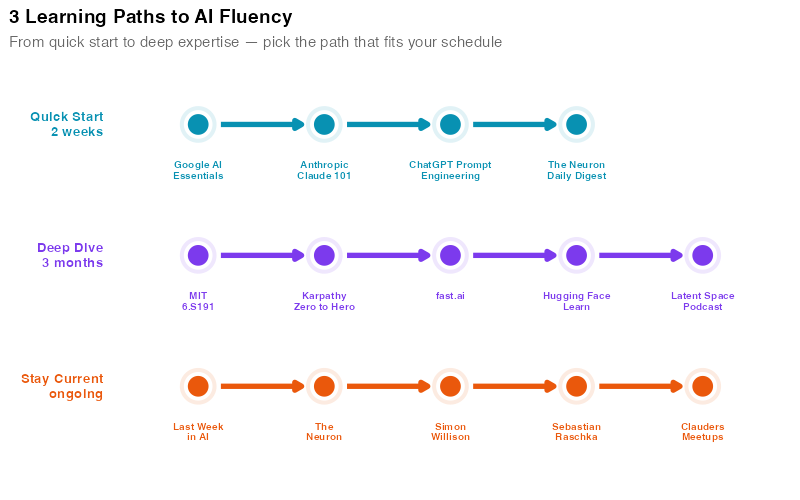
"I have one weekend" — Start with Anthropic Academy’s "Claude 101," then watch Karpathy’s "Deep Dive into LLMs" on Sunday. By Monday, you’ll understand what AI is, how it works, and how to use it. Subscribe to The Neuron for daily updates.
"I have a month" — Add DeepLearning.AI’s "ChatGPT Prompt Engineering for Developers" and fast.ai’s "Practical Deep Learning for Coders." Subscribe to Simon Willison and Maria Sukhareva. Join your local Clauders meetup. You’ll go from "curious" to "competent."
"I want to go deep" — Everything above, plus MIT 6.S191, Karpathy’s "Zero to Hero" series, Sebastian Raschka’s newsletter, and the Latent Space podcast. You’ll be dangerous.
Interactive Dashboard
Explore the full resource landscape yourself — filter by media type, skill level, and time commitment to build your personal AI learning path.
Interactive Dashboard
Explore the data yourself — adjust parameters and see the results update in real time.
Your Next Steps
-
Block 2 hours this week for Anthropic Academy’s "Claude 101." Don’t "find time" — book it in your calendar like a meeting. This single course gets you from zero to productive with an AI tool. When your CEO asks "what have you tried?", you’ll have a real answer.
-
Subscribe to exactly 3 newsletters: The Neuron (daily headlines), Simon Willison (practitioner insights), and one specialist. If you’re in demand planning, pick Konrad Banachewicz. If you’re making AI strategy decisions, pick Gary Marcus. If you want technical depth, pick Sebastian Raschka. Three is enough. More than three and you’ll drown.
-
Add one AI podcast to your commute rotation. Practical AI if you want breadth. Latent Space if you want depth. NVIDIA AI Podcast if you want supply chain–adjacent applications. Listen to three episodes, then decide if it stays in your rotation.
-
Find your nearest Clauders meetup at clauders.com and register. In-person learning is 10x more effective than solo study for building practical AI skills. If there’s no meetup in your city yet, consider starting one — the Clauders community provides all the resources you need to organize.
-
Pick one real work problem and apply AI to it this week. Not a toy problem — a real one. Summarize a long supplier contract. Draft an RFQ response. Analyze a demand forecast. The gap between "I took a course" and "I used AI at work" is where the actual learning happens. The R code below generates visualizations to help you map out which resources match your learning goals.
Show R Code
# =============================================================================
# AI Learning Guide — Image Generation
# =============================================================================
# Generates 3 visualizations for the "Best Free Places to Learn AI" post.
#
# Required packages: ggplot2, dplyr, tidyr, scales, patchwork, ggrepel
# Output: Images/ai_learn_*.png (800px wide, white background)
# =============================================================================

library(ggplot2)
library(dplyr)
library(tidyr)
library(scales)
library(patchwork)
library(ggrepel)

# --- Theme for all plots ---
theme_ai_learn <- theme_minimal(base_size = 13) +
  theme(
    plot.title = element_text(face = "bold", size = 14),
    plot.subtitle = element_text(color = "grey40", size = 11),
    panel.grid.minor = element_blank(),
    legend.position = "bottom"
  )

# --- Color palette (fresh, modern "learning" theme) ---
col_academy   <- "#0891b2"  # Teal
col_course    <- "#7c3aed"  # Purple
col_podcast   <- "#ea580c"  # Orange
col_blog      <- "#16a34a"  # Green
col_community <- "#db2777"  # Pink

type_colors <- c(
  "Academy"   = col_academy,
  "Course"    = col_course,
  "Podcast"   = col_podcast,
  "Blog"      = col_blog,
  "Community" = col_community
)

# =============================================================================
# DATA — AI Learning Resources
# =============================================================================

resources <- data.frame(
  name = c(
    "Anthropic Academy", "OpenAI Academy", "Google AI/Skills", "Microsoft Learn",
    "DeepLearning.AI", "fast.ai", "Hugging Face Learn", "MIT 6.S191",
    "Stanford CS229", "Karpathy Zero to Hero",
    "Latent Space", "Lex Fridman", "NVIDIA AI Podcast", "Practical AI",
    "Last Week in AI", "Cognitive Revolution",
    "Sebastian Raschka", "The Neuron", "Gary Marcus", "Simon Willison", "SemiAnalysis",
    "Clauders"
  ),
  type = c(
    "Academy", "Academy", "Academy", "Academy",
    "Course", "Course", "Course", "Course", "Course", "Course",
    "Podcast", "Podcast", "Podcast", "Podcast", "Podcast", "Podcast",
    "Blog", "Blog", "Blog", "Blog", "Blog",
    "Community"
  ),
  level_min = c(
    1, 1, 1, 1,
    1, 2, 2, 1, 3, 1,
    2, 1, 1, 1, 1, 2,
    2, 1, 1, 2, 2,
    1
  ),
  level_max = c(
    2, 2, 3, 3,
    3, 2, 2, 2, 3, 3,
    3, 3, 2, 2, 3, 3,
    3, 2, 3, 3, 3,
    3
  ),
  size_metric = c(
    12, 20, 3000, 100,
    150, 2, 12, 1, 1, 7,
    174, 490, 294, 340, 233, 243,
    150000, 500000, 100000, 50000, 240000,
    133
  ),
  stringsAsFactors = FALSE
)

# Midpoint of level range for plotting
resources <- resources %>%
  mutate(
    level_mid = (level_min + level_max) / 2,
    type_factor = factor(type, levels = c("Academy", "Course", "Podcast", "Blog", "Community"))
  )

# =============================================================================
# CHART 1: AI Learning Resource Landscape — Faceted Range Chart (800x700)
# =============================================================================

# Each resource gets its own row, faceted by type — no collisions
resources_chart <- resources %>%
  mutate(
    name = factor(name, levels = rev(name)),
    type_label = case_when(
      type == "Academy"   ~ "Official Academies",
      type == "Course"    ~ "Courses & MOOCs",
      type == "Podcast"   ~ "Podcasts",
      type == "Blog"      ~ "Blogs & Newsletters",
      type == "Community" ~ "Community"
    ),
    type_label = factor(type_label, levels = c(
      "Official Academies", "Courses & MOOCs", "Podcasts",
      "Blogs & Newsletters", "Community"
    ))
  )

p1 <- ggplot(resources_chart, aes(y = name)) +
  geom_segment(
    aes(x = level_min, xend = level_max, yend = name, color = type_factor),
    linewidth = 5, alpha = 0.25, lineend = "round"
  ) +
  geom_point(aes(x = level_min, color = type_factor), size = 3) +
  geom_point(aes(x = level_max, color = type_factor), size = 3) +
  facet_grid(
    type_label ~ ., scales = "free_y", space = "free_y",
    switch = "y"
  ) +
  scale_color_manual(values = type_colors, guide = "none") +
  scale_x_continuous(
    breaks = 1:3,
    labels = c("Beginner", "Intermediate", "Advanced"),
    limits = c(0.7, 3.3),
    position = "top"
  ) +
  labs(
    title = "The AI Learning Resource Landscape",
    subtitle = "22 free resources by skill level — bars show the range each resource covers",
    x = NULL, y = NULL
  ) +
  theme_ai_learn +
  theme(
    strip.text.y.left = element_text(
      angle = 0, face = "bold", size = 10, color = "grey30", hjust = 1
    ),
    strip.placement = "outside",
    strip.background = element_blank(),
    panel.grid.major.y = element_blank(),
    panel.grid.minor.x = element_blank(),
    panel.spacing = unit(0.4, "lines"),
    axis.text.y = element_text(size = 10, face = "bold"),
    axis.text.x.top = element_text(size = 11, face = "bold"),
    legend.position = "none"
  )

ggsave("https://inphronesys.com/wp-content/uploads/2026/02/ai_learn_resource_landscape-1.png", p1,
       width = 8, height = 7, dpi = 100, bg = "white")

# =============================================================================
# CHART 2: Platform Comparison — The 4 Official AI Academies (800x500)
# =============================================================================

academies <- data.frame(
  platform = c("Google AI / Skills", "Microsoft Learn", "OpenAI Academy", "Anthropic Academy"),
  courses = c(3000, 100, 20, 12),
  label_text = c(
    "3,000+ courses\nHands-on labs\nBroadest library",
    "100+ AI paths\n7 certifications\nAzure integrated",
    "20+ courses\nSector-specific tracks\nCertifications coming",
    "12+ courses\nFree certificates\n3 learning tracks"
  ),
  brand_color = c("#4285F4", "#00A4EF", "#10a37f", "#d97706"),
  stringsAsFactors = FALSE
)

academies <- academies %>%
  mutate(platform = factor(platform, levels = platform))

p2 <- ggplot(academies, aes(x = courses, y = platform, fill = platform)) +
  geom_col(width = 0.6, show.legend = FALSE) +
  geom_text(
    data = academies %>% filter(courses >= 1000),
    aes(x = courses * 0.5, label = label_text),
    hjust = 0.5, size = 3, color = "white", fontface = "bold", lineheight = 0.9
  ) +
  geom_text(
    data = academies %>% filter(courses >= 1000),
    aes(label = paste0(comma(courses), "+")),
    hjust = -0.15, size = 4.2, fontface = "bold", color = "grey30"
  ) +
  geom_text(
    data = academies %>% filter(courses < 1000),
    aes(label = paste0(courses, "+")),
    hjust = -0.15, size = 4.2, fontface = "bold", color = "grey30"
  ) +
  geom_text(
    data = academies %>% filter(courses < 1000),
    aes(x = courses + 350, label = label_text),
    hjust = 0, size = 3, color = "grey40", lineheight = 0.9
  ) +
  scale_fill_manual(values = setNames(academies$brand_color, academies$platform)) +
  scale_x_continuous(
    expand = expansion(mult = c(0, 0.45)),
    labels = comma_format()
  ) +
  labs(
    title = "The 4 Official AI Academies Compared",
    subtitle = "Number of courses and resources — each platform has a distinct strength",
    x = "Number of Courses / Resources",
    y = NULL
  ) +
  theme_ai_learn +
  theme(
    panel.grid.major.y = element_blank(),
    axis.text.y = element_text(face = "bold", size = 12)
  )

ggsave("https://inphronesys.com/wp-content/uploads/2026/02/ai_learn_platform_comparison-1.png", p2,
       width = 8, height = 5, dpi = 100, bg = "white")

# =============================================================================
# CHART 3: Suggested Learning Paths (800x500)
# =============================================================================

path_data <- data.frame(
  path = c(
    rep("Quick Start\n(2 weeks)", 4),
    rep("Deep Dive\n(3 months)", 5),
    rep("Stay Current\n(ongoing)", 5)
  ),
  step = c(
    1, 2, 3, 4,
    1, 2, 3, 4, 5,
    1, 2, 3, 4, 5
  ),
  resource = c(
    "Google AI\nEssentials", "Anthropic\nClaude 101", "ChatGPT Prompt\nEngineering", "The Neuron\nDaily Digest",
    "MIT\n6.S191", "Karpathy\nZero to Hero", "fast.ai", "Hugging Face\nLearn", "Latent Space\nPodcast",
    "Last Week\nin AI", "The\nNeuron", "Simon\nWillison", "Sebastian\nRaschka", "Clauders\nMeetups"
  ),
  stringsAsFactors = FALSE
)

path_colors <- c(
  "Quick Start\n(2 weeks)" = "#0891b2",
  "Deep Dive\n(3 months)" = "#7c3aed",
  "Stay Current\n(ongoing)" = "#ea580c"
)

path_y_map <- c("Quick Start\n(2 weeks)" = 3, "Deep Dive\n(3 months)" = 2, "Stay Current\n(ongoing)" = 1)

path_data <- path_data %>%
  mutate(
    x = step,
    y = path_y_map[path],
    path_factor = factor(path, levels = names(path_y_map))
  )

segments_data <- path_data %>%
  group_by(path) %>%
  arrange(step) %>%
  mutate(
    x_end = lead(x),
    y_end = lead(y)
  ) %>%
  filter(!is.na(x_end)) %>%
  ungroup()

p3 <- ggplot() +
  geom_segment(
    data = segments_data,
    aes(x = x + 0.18, xend = x_end - 0.18, y = y, yend = y_end, color = path_factor),
    linewidth = 1.8,
    arrow = arrow(length = unit(0.2, "cm"), type = "closed"),
    show.legend = FALSE
  ) +
  geom_point(
    data = path_data,
    aes(x = x, y = y, color = path_factor),
    size = 12, shape = 16, alpha = 0.12, show.legend = FALSE
  ) +
  geom_point(
    data = path_data,
    aes(x = x, y = y, fill = path_factor),
    size = 7, shape = 21, color = "white", stroke = 2
  ) +
  geom_text(
    data = path_data,
    aes(x = x, y = y - 0.28, label = resource, color = path_factor),
    size = 2.6, fontface = "bold", lineheight = 0.85,
    vjust = 1, show.legend = FALSE
  ) +
  annotate("text", x = 0.25, y = 3, label = "Quick Start\n2 weeks",
           hjust = 1, size = 3.5, fontface = "bold", color = path_colors[1], lineheight = 0.9) +
  annotate("text", x = 0.25, y = 2, label = "Deep Dive\n3 months",
           hjust = 1, size = 3.5, fontface = "bold", color = path_colors[2], lineheight = 0.9) +
  annotate("text", x = 0.25, y = 1, label = "Stay Current\nongoing",
           hjust = 1, size = 3.5, fontface = "bold", color = path_colors[3], lineheight = 0.9) +
  scale_color_manual(values = path_colors, name = "Learning Path") +
  scale_fill_manual(values = path_colors, name = "Learning Path") +
  scale_x_continuous(limits = c(-0.5, 5.7), expand = c(0, 0)) +
  scale_y_continuous(limits = c(0.2, 3.5), expand = c(0, 0)) +
  labs(
    title = "3 Learning Paths to AI Fluency",
    subtitle = "From quick start to deep expertise — pick the path that fits your schedule"
  ) +
  theme_ai_learn +
  theme(
    axis.text = element_blank(),
    axis.title = element_blank(),
    panel.grid = element_blank(),
    legend.position = "none"
  )

ggsave("https://inphronesys.com/wp-content/uploads/2026/02/ai_learn_learning_paths-1.png", p3,
       width = 8, height = 5, dpi = 100, bg = "white")
References
- Anthropic. (2025). Anthropic Academy. Retrieved from https://anthropic.skilljar.com
- OpenAI. (2024). OpenAI Academy — AI Education for Everyone. Retrieved from https://academy.openai.com
- Google. (2025). Learn AI Skills — Google AI. Retrieved from https://ai.google/learn-ai-skills
- Microsoft. (2026). AI Learning Hub — Microsoft Learn. Retrieved from https://learn.microsoft.com/ai
- Ng, A. (2025). DeepLearning.AI Course Catalog. Retrieved from https://www.deeplearning.ai/courses
- Howard, J. (2025). Practical Deep Learning for Coders — fast.ai. Retrieved from https://course.fast.ai
- Hugging Face. (2025). Hugging Face Learn. Retrieved from https://huggingface.co/learn
- Karpathy, A. (2024). Neural Networks: Zero to Hero [Video series]. YouTube.
- Lex Fridman. (2026). Lex Fridman Podcast — Episode Archive. Retrieved from https://lexfridman.com/podcast
- Wang, S. & Fanelli, A. (2025). Latent Space — The AI Engineer Podcast. Retrieved from https://www.latent.space
- Raschka, S. (2025). Ahead of AI — Newsletter Archive. Retrieved from https://magazine.sebastianraschka.com
- Willison, S. (2025). Simon Willison’s Weblog. Retrieved from https://simonwillison.net
- Marcus, G. (2025). Gary Marcus — Substack. Retrieved from https://garymarcus.substack.com
- Clauders. (2026). Global Claude Code Meetup Community. Retrieved from https://clauders.com
Leave a Reply