
The Day Prompting Died
In April 2025, Shopify CEO Tobi Lütke sent an internal memo that landed like a grenade: AI usage is no longer optional. It is a baseline expectation for every employee, in every role, effective immediately.
Months later, in January 2026, he walked the talk. Lütke took a USB stick with his personal MRI scans, pointed Claude at it, and asked it to find all reports, convert the images into something usable, and organize everything into a structured output directory. One prompt. The result: a working HTML-based viewer tool — not a toy demo, but something he actually used.
Here’s the part that matters: his prompt was short and direct, but it was not vague. It specified the data source, the desired transformations, the output structure, and the end goal. It told the AI what to do, where to find the inputs, and how to organize the results.
Lütke didn’t just write a prompt. He engineered a context.
And that distinction — between prompting and context engineering — is the single most important skill gap in professional AI usage today. In June 2025, Andrej Karpathy called context engineering "the delicate art and science of filling the context window with just the right information for the next step." Now, in early 2026, with frontier models shipping autonomous agent capabilities, the gap isn’t academic anymore. It’s operational.
But context engineering is only part of the story. In February 2026, Nate B Jones — who publishes AI News & Strategy Daily across Substack, YouTube, and podcast — published an article that crystallized what many practitioners were feeling: prompting hasn’t just evolved. It has split into four fundamentally different skills. And most of us are still only practicing one.
The 35-Minute Wall
To understand why prompting fractured, you need to understand what changed in 2025-2026.
In early 2025, you interacted with AI like a conversation. You typed a question, got a response, tweaked the wording, tried again. The feedback loop was tight and the stakes were low. If the AI went off-course, you’d notice in seconds and correct it.
Then autonomous agents arrived.
Now you’re writing instructions for a system that will execute for 35 minutes without you. It will call APIs, search databases, generate code, chain together multi-step workflows — all on its own. If the instructions are ambiguous, the agent doesn’t ask for clarification. It makes its best guess and keeps going. Often confidently. Often wrong.
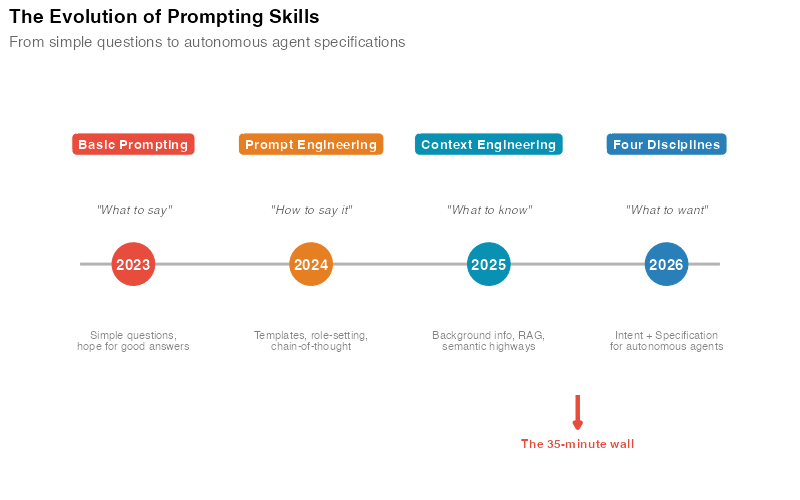
This is what Nate B Jones calls the 35-minute wall. It’s the moment your AI interaction extends beyond a quick back-and-forth chat — the moment you hand off a complex task and walk away. At that point, every assumption from 2025-era prompting breaks down. Your instructions need to be precise. Your intent needs to be explicit. Your guardrails need to be engineered. And the agent needs to understand not just what to do, but what to want.
That’s not one skill. That’s four.
Four Skills, Not One
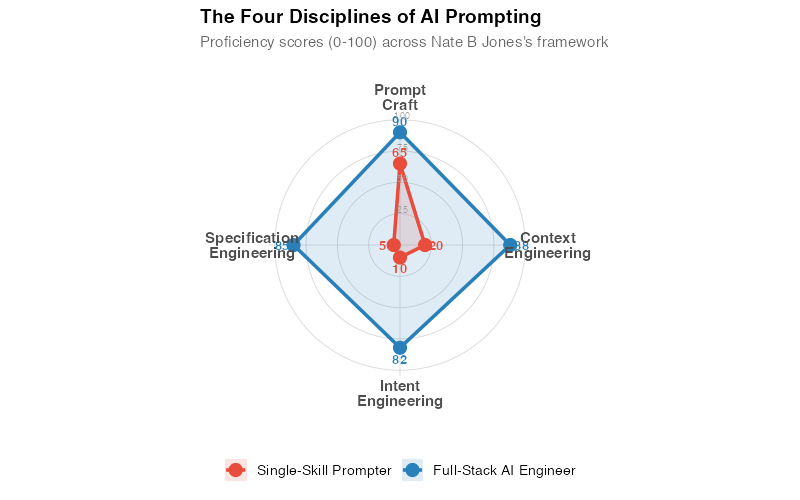
Nate B Jones’s framework identifies four distinct disciplines that have emerged from the wreckage of "prompt engineering." Each one solves a different problem. Each one requires a different kind of thinking. And the gap between someone who practices all four versus someone who only does the first is enormous — and compounding daily.
Here’s the evolution in three layers:
- Prompt engineering tells the AI what to do
- Context engineering tells the AI what to know
- Intent engineering tells the AI what to want
And beneath all of them, specification engineering provides the detailed execution brief for autonomous work.
Discipline 1: Prompt Craft
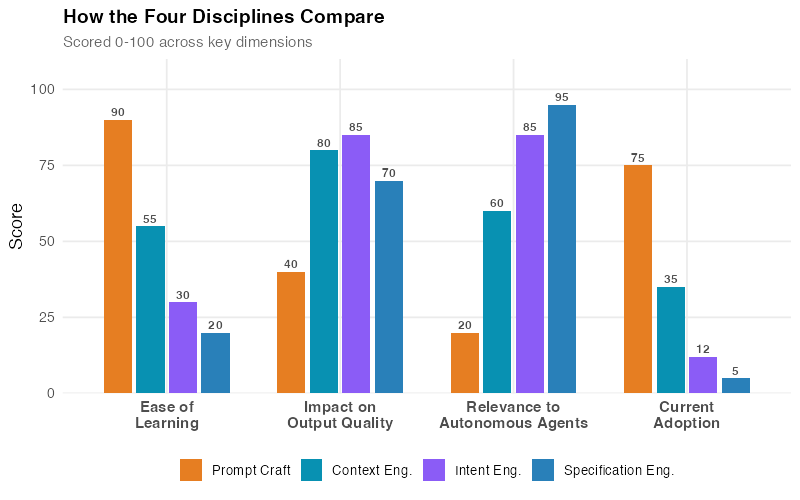
What it is: Structuring requests effectively — what most people still call "prompt engineering." Choosing the right words, framing the task clearly, using techniques like chain-of-thought reasoning, few-shot examples, or role-setting to get better responses.
Why it’s necessary but insufficient: Prompt craft is the foundation. You need it. But it’s like knowing how to write a clear email — it gets you in the door, but it doesn’t close the deal.
Most people stop here. They discover a few techniques — "Act as a senior analyst," "Think step by step," "Give me three options" — and assume they’ve mastered AI. They haven’t. They’ve mastered the first of four skills.
Here’s what good prompt craft looks like across different domains:
| Domain | Weak Prompt | Crafted Prompt |
|---|---|---|
| Marketing | "Write me an ad for our product" | "Write a 90-word Facebook ad for [product] targeting [audience]. Lead with the pain point of [problem]. Include one social proof element and a clear CTA. Tone: conversational, not salesy." |
| Software Dev | "Fix this bug" | "This function throws a NullPointerException on line 42 when the user list is empty. Identify the root cause, fix it, and add a guard clause. Keep the existing behavior for non-empty lists." |
| Legal | "Summarize this contract" | "Identify all obligations, deadlines, and penalty clauses in this vendor agreement. Flag any clause that creates uncapped liability or automatic renewal. Output as a table." |
| Education | "Explain photosynthesis" | "Explain photosynthesis to a 10th-grade biology student. Use an analogy they’d understand, then transition to the actual chemistry. End with two practice questions." |
The difference is specificity, not sophistication. Good prompt craft is about removing ambiguity so the model doesn’t have to guess.
Discipline 2: Context Engineering
What it is: Providing the right background information for the AI to work with — the documents, data, examples, constraints, and domain knowledge that shape the response.
The key insight: The quality of AI output is determined less by how you phrase your question and more by what information is available when the model generates its answer. As Nate B Jones puts it, correctness trumps compression. It’s better to include more of the right context than to craft a perfect but information-starved prompt.
Context engineering involves two layers:
- Deterministic context: Fixed information that doesn’t change — style guides, company policies, reference documents, data dictionaries. This goes into system prompts or retrieval-augmented generation (RAG) pipelines.
- Probabilistic context: Dynamic information that varies per task — the specific user query, real-time data, recent conversation history, retrieved documents. This gets assembled on the fly.
Nate calls the pathways between these layers semantic highways — the structured connections that route the right information to the right place at the right time. A well-designed context system doesn’t just dump everything into the window. It selectively surfaces what’s relevant.
Examples across domains:
A financial analyst building an AI-assisted earnings report doesn’t just prompt "analyze Q4 results." They provide: the raw financial data, last quarter’s report for tone/format consistency, the company’s earnings call talking points, analyst consensus estimates, and explicit instructions on what metrics to highlight. That’s context engineering.
A content creator building a newsletter workflow doesn’t just ask "write about AI trends." They feed the model: their brand voice guide, three examples of past newsletters, the specific stories they want covered, their audience demographics, and the publication’s editorial standards. That’s context engineering.
A healthcare administrator building a patient triage assistant doesn’t just prompt "classify this case." They provide: the hospital’s triage protocols, the patient’s medical history, current wait times and resource availability, and explicit rules about when to escalate to a human. That’s context engineering.
The difference between a mediocre AI interaction and a great one is almost never the prompt. It’s the context.
Discipline 3: Intent Engineering
What it is: Encoding decision-making rules, priorities, and preferences — telling the AI what it should want, not just what it should do.
Why it matters: When autonomous agents encounter ambiguity — and they always do — they need to make tradeoffs. Without explicit intent, they’ll optimize for… something. You just won’t know what until the consequences arrive.
Nate B Jones describes this as the most underappreciated of the four disciplines. Prompt craft and context engineering are relatively intuitive — people understand that clear questions and good data produce better answers. But intent engineering requires you to think about values, priorities, and tradeoff hierarchies — things most people never articulate, even to themselves.
Consider these examples:
A marketing team asks an AI agent to optimize their email campaign. Without intent: the agent maximizes open rates by writing increasingly clickbaity subject lines. Engagement goes up, but brand trust erodes. The intent was never stated: "Optimize engagement while maintaining brand voice consistency and long-term subscriber trust."
A software team asks an AI coding assistant to refactor a module. Without intent: the agent refactors for maximum code elegance — breaking the public API in the process. The intent was missing: "Improve internal code quality without breaking any existing public interfaces or changing behavior for current consumers."
A legal team asks an AI to draft a contract response. Without intent: the agent produces an aggressively protective draft that maximizes legal safety but torpedoes the business relationship. The intent wasn’t stated: "Protect our key interests while maintaining a collaborative tone that preserves the partnership."
In each case, the AI did exactly what it was asked to do. The problem was what it wasn’t asked to want.
Intent engineering means making your tradeoff hierarchy explicit:
| Priority | Intent Statement |
|---|---|
| 1 (highest) | Never compromise user safety or regulatory compliance |
| 2 | Preserve existing functionality and backwards compatibility |
| 3 | Optimize for the stated business goal |
| 4 | Minimize cost and resource usage |
| 5 (lowest) | Maximize elegance and code quality |
When priorities conflict — and they will — the agent now knows which one wins.
Discipline 4: Specification Engineering
What it is: Writing detailed execution briefs for autonomous AI workers — the complete, unambiguous instructions that allow an agent to operate independently for extended periods.
The analogy: Think of it as writing a Statement of Work for a contractor you can’t supervise in real time. Every ambiguity in your spec is a decision the contractor will make for you — and you might not like the result.
This is where Nate B Jones’s concept of contract-first prompting comes in. Before the agent does anything, you define the contract: what the inputs are, what the outputs must look like, what constitutes success, what constitutes failure, and what to do when things go wrong.
Specification engineering is what separates people who use AI for quick questions from people who deploy AI for production workflows. It’s the discipline most relevant to the autonomous agent era — because an agent running for 35 minutes needs a specification that anticipates edge cases you’ll never see in a chat window.
What a specification includes:
- Input definition: What data the agent will receive, in what format, and what’s missing or unreliable
- Output requirements: Format, structure, length, level of detail, delivery method
- Quality criteria: How to evaluate whether the output is good enough (testable, measurable criteria)
- Negative constraints: What the agent must NOT do ("Do not hallucinate citations," "Do not modify files outside the /src directory," "Do not make API calls to production endpoints")
- Edge case handling: What to do when inputs are malformed, data is missing, or the task is ambiguous
- Escalation rules: When to stop and ask for human input instead of guessing
Nate B Jones highlights the reversibility gap here: in a chat, a bad response costs you ten seconds. You just re-prompt. In an autonomous agent workflow, a bad decision at minute 3 compounds through 32 more minutes of execution. The specification needs to be robust enough that the agent can self-correct — or at least stop before causing damage.
The Klarna Trap: A Masterclass in Missing Intent
This is the cautionary tale every AI practitioner should study carefully — and Nate B Jones uses it as a canonical example of what happens when you nail the context but miss the intent.
In 2025, Klarna — the Swedish fintech giant — automated roughly two-thirds of its customer service interactions with AI. The projected savings were enormous: CEO Sebastian Siemiatkowski cited figures in the range of $40-60 million annually. The specification was excellent: the AI could handle refund requests, answer product questions, and resolve billing disputes faster than human agents. By every efficiency metric, it was a triumph.
Then customer satisfaction dropped. Complaint escalations surged. And Siemiatkowski publicly admitted the company had "probably over-indexed" on automation. Klarna began rehiring human agents.
What went wrong? The specification was technically sound. The context was comprehensive. The AI could do everything it was asked to do. But the intent was wrong — or rather, unstated.
The implicit intent behind customer service isn’t just "resolve tickets efficiently." It’s "make customers feel heard, valued, and confident in their relationship with the brand." Speed was a means, not the end. The AI had excellent context but missing intent — the Klarna Trap, as Nate calls it.
The fix wasn’t better prompts. It was a hybrid model with explicit intent: AI handles straightforward, transactional queries (tracking numbers, refund status, account changes) while human agents handle emotionally complex interactions (disputes, complaints, frustrated customers). The intent was finally articulated: efficiency for simple tasks, empathy for complex ones.
This pattern repeats everywhere:
- A recruiting team automates candidate screening. Without intent, the AI optimizes for speed and keyword matching — screening out unconventional candidates who would have been great hires. The missing intent: "Prioritize potential and transferable skills, not just exact keyword matches."
- A news organization uses AI to generate article summaries. Without intent, the AI optimizes for brevity — stripping nuance from complex stories. The missing intent: "Preserve critical caveats and counterarguments even at the cost of length."
- A customer success team deploys an AI to handle onboarding. Without intent, the AI rushes through setup steps for maximum speed. The missing intent: "Ensure the customer actually understands each step before moving to the next."
The Klarna Trap isn’t about bad AI. It’s about good AI pursuing the wrong goal.
The Maturity Model: Where Do You Stand?
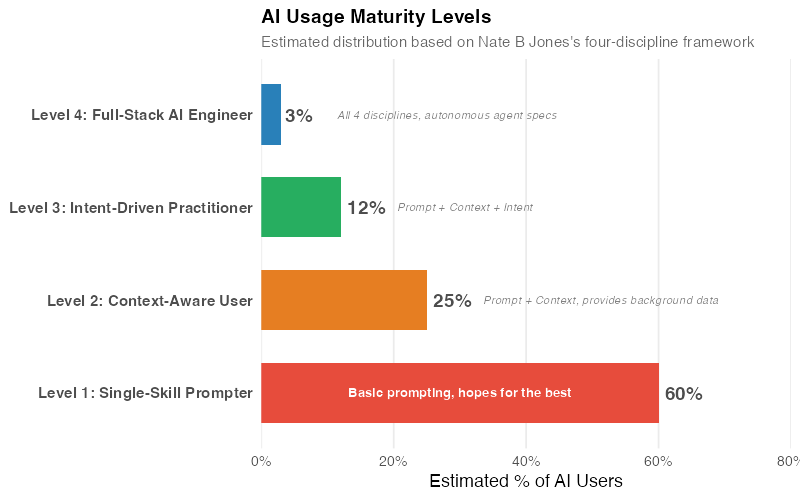
Based on Nate B Jones’s four-discipline framework, AI users fall along a maturity spectrum. The following estimated distribution reflects what we observe across professional AI communities — it’s not a published statistic, but a reasonable approximation. Nate describes "good taste" as the meta-skill that ties it all together — the ability to recognize quality output and know when something is off, even before you can articulate why.
Level 1: Single-Skill Prompter (~60% of users)
You type natural-language questions and accept whatever comes back. You’ve maybe learned a few tricks — "act as an expert," "think step by step" — but you’re operating entirely within Prompt Craft. This works for casual use: summarizing emails, brainstorming ideas, answering factual questions. It fails for anything where the answer needs to be right, not just plausible.
Level 2: Context-Aware User (~25% of users)
You’ve realized that providing background information dramatically improves output. You paste in relevant documents, provide examples, include data. You’re practicing Prompt Craft + Context Engineering. Your results are noticeably better than Level 1, but you’re still not thinking about intent or building specifications for autonomous work.
Level 3: Intent-Driven Practitioner (~12% of users)
You explicitly state your priorities and tradeoff preferences. You understand that the same data can serve completely different purposes depending on the goal. You provide context and tell the AI what to optimize for — and what to protect. You’re operating across three disciplines. This is where AI becomes genuinely powerful for professional work.
Level 4: Full-Stack AI Engineer (~3% of users)
The complete package. Prompt Craft, Context Engineering, Intent Engineering, and Specification Engineering. You write detailed execution briefs. You anticipate edge cases. You build in quality checks. You can deploy autonomous agents for extended tasks and trust the results — because you’ve engineered the specifications thoroughly enough that the agent knows what to do, what to know, what to want, and when to stop.
The jump from Level 1 to Level 2 is straightforward — read a few guides, start providing context. The jump from Level 2 to Level 3 requires a mindset shift: you need to think about why before what. The jump from Level 3 to Level 4 requires systems thinking — the ability to anticipate failure modes and design for them in advance.
Where It Breaks: Honest Limitations
These four disciplines are powerful, but they’re not magic. Here’s where they fall short:
Data quality still matters. The most beautifully engineered context can’t fix garbage input data. If your CRM is full of duplicates, your financial data has gaps, or your training materials are outdated, the AI will produce confidently wrong output. Context engineering amplifies the value of good data — it doesn’t replace it.
Domain expertise is non-negotiable. You can’t engineer effective intent for a domain you don’t understand. An intent engineer who doesn’t know healthcare will write priority hierarchies that miss critical safety considerations. A specification engineer who doesn’t know software architecture will write execution briefs that produce fragile code. The four disciplines amplify expertise — they don’t substitute for it.
Diminishing returns are real. Going from Level 1 to Level 3 might transform your AI output quality dramatically. Going from Level 3 to Level 4 adds more incremental gains. For many use cases, Level 3 is sufficient. Don’t over-engineer specifications for tasks where "good enough" is genuinely good enough.
Models have real limits. Even with perfect context, intent, and specification, current models hallucinate, make reasoning errors, and struggle with certain types of quantitative analysis. The four disciplines reduce these problems — they don’t eliminate them. Always verify critical outputs.
Your Next Steps
Here are five concrete actions you can take this week — not next quarter, this week:
-
Audit your last 10 AI interactions. Look at your ChatGPT, Claude, or Copilot history. For each one, ask: Did I provide context beyond the question? Did I state my intent? Did I specify quality criteria? Most people discover they’re operating at Level 1-2 and didn’t realize it.
-
Pick your most common AI task and add intent. Whatever you use AI for most — writing, coding, analysis, research — add an explicit statement of purpose and priority hierarchy next time. "I want X, and when tradeoffs arise, prioritize Y over Z." Notice how the output changes.
-
Build one reusable context template. Take your most frequent task and create a reusable template that includes: background information, relevant examples, output format, quality criteria, and negative constraints. Save it. Reuse it. Iterate on it.
-
Study the Klarna Trap. Before your next AI deployment (even a personal one), ask yourself: "What is this AI optimizing for, and is that what I actually want?" If you can’t answer clearly, you’re at risk.
-
Read Nate B Jones’s original article. The framework described here is based on his work. His Substack goes deeper on each discipline, includes additional examples, and offers a free prompt kit for practicing each skill.
The full R code used to generate the visualizations in this post is available below.
Show R Code
# =============================================================================
# Four Disciplines of Prompting — Visualization Code
# =============================================================================
# Generates all 4 charts for "Prompting Just Split Into 4 Different Skills"
# Based on Nate B Jones's framework.
# Run with: Rscript generate_ce_images.R
#
# Required packages: ggplot2, dplyr, tidyr, scales, patchwork
# Output: Images/ce_*.png (800px wide, white background)
# =============================================================================

library(ggplot2)
library(dplyr)
library(tidyr)
library(scales)
library(patchwork)

# === Theme & Color Palette ===================================================

theme_ce <- theme_minimal(base_size = 13) +
  theme(
    plot.title = element_text(face = "bold", size = 14),
    plot.subtitle = element_text(color = "grey40", size = 11),
    panel.grid.minor = element_blank(),
    legend.position = "bottom"
  )

col_blue   <- "#2980b9"
col_red    <- "#e74c3c"
col_green  <- "#27ae60"
col_orange <- "#e67e22"
col_purple <- "#8b5cf6"
col_teal   <- "#0891b2"

# === CHART 1: Skills Radar — Single-Skill vs Full-Stack =====================

skill_labels <- c("Prompt\nCraft", "Context\nEngineering",
                   "Intent\nEngineering", "Specification\nEngineering")
n_skills <- 4

angles <- seq(pi/2, pi/2 - 2*pi, length.out = n_skills + 1)[1:n_skills]

polar_to_xy <- function(angle, radius) {
  data.frame(x = radius * cos(angle), y = radius * sin(angle))
}

scores_basic   <- c(65, 20, 10, 5)   # Prompt Craft, Context, Intent, Spec
scores_fullstack <- c(90, 88, 82, 85)

make_polygon <- function(scores, profile_name) {
  pts <- polar_to_xy(angles, scores / 100)
  pts <- rbind(pts, pts[1, ])
  pts$profile <- profile_name
  pts
}

poly_basic     <- make_polygon(scores_basic, "Single-Skill Prompter")
poly_fullstack <- make_polygon(scores_fullstack, "Full-Stack AI Engineer")
poly_data      <- rbind(poly_basic, poly_fullstack)
poly_data$profile <- factor(poly_data$profile,
                            levels = c("Single-Skill Prompter", "Full-Stack AI Engineer"))

pts_basic     <- polar_to_xy(angles, scores_basic / 100)
pts_basic$profile <- "Single-Skill Prompter"; pts_basic$score <- scores_basic
pts_fullstack <- polar_to_xy(angles, scores_fullstack / 100)
pts_fullstack$profile <- "Full-Stack AI Engineer"; pts_fullstack$score <- scores_fullstack
pts_data <- rbind(pts_basic, pts_fullstack)
pts_data$profile <- factor(pts_data$profile,
                           levels = c("Single-Skill Prompter", "Full-Stack AI Engineer"))

grid_circles <- do.call(rbind, lapply(c(25, 50, 75, 100), function(r) {
  theta <- seq(0, 2*pi, length.out = 100)
  data.frame(x = (r/100)*cos(theta), y = (r/100)*sin(theta), r = r)
}))

spoke_data <- data.frame(x = 0, y = 0,
  xend = cos(angles) * 1.05, yend = sin(angles) * 1.05)

label_data <- data.frame(
  x = 1.18 * cos(angles), y = 1.18 * sin(angles), label = skill_labels)

pts_data$lx <- pts_data$x + 0.09 * cos(rep(angles, 2))
pts_data$ly <- pts_data$y + 0.09 * sin(rep(angles, 2))

profile_colors <- c("Single-Skill Prompter" = col_red, "Full-Stack AI Engineer" = col_blue)

p1 <- ggplot() +
  geom_path(data = grid_circles, aes(x = x, y = y, group = r),
            color = "grey85", linewidth = 0.3) +
  geom_segment(data = spoke_data, aes(x = x, y = y, xend = xend, yend = yend),
               color = "grey85", linewidth = 0.3) +
  geom_polygon(data = poly_data, aes(x = x, y = y, fill = profile, group = profile),
               alpha = 0.15, color = NA) +
  geom_path(data = poly_data, aes(x = x, y = y, color = profile, group = profile),
            linewidth = 1.2) +
  geom_point(data = pts_data, aes(x = x, y = y, color = profile), size = 4) +
  geom_text(data = pts_data, aes(x = lx, y = ly, label = score, color = profile),
            size = 3.5, fontface = "bold", show.legend = FALSE) +
  geom_text(data = label_data, aes(x = x, y = y, label = label),
            size = 3.8, fontface = "bold", color = "grey30", lineheight = 0.85) +
  annotate("text", x = 0.02, y = c(0.25, 0.50, 0.75, 1.00) + 0.03,
           label = c("25", "50", "75", "100"), size = 2.5, color = "grey60") +
  scale_color_manual(values = profile_colors, name = NULL) +
  scale_fill_manual(values = profile_colors, name = NULL) +
  coord_fixed(xlim = c(-1.45, 1.45), ylim = c(-1.35, 1.35)) +
  labs(title = "The Four Disciplines of AI Prompting",
       subtitle = "Proficiency scores (0-100) across Nate B Jones's framework") +
  theme_ce +
  theme(axis.text = element_blank(), axis.title = element_blank(),
        axis.ticks = element_blank(), panel.grid = element_blank())

ggsave("https://inphronesys.com/wp-content/uploads/2026/03/ce_skills_radar-1.png", p1,
       width = 8, height = 5, dpi = 100, bg = "white")

# === CHART 2: Evolution Timeline =============================================

evolution_data <- data.frame(
  year = c(2023, 2024, 2025, 2026),
  era = c("Basic Prompting", "Prompt Engineering", "Context Engineering", "Four Disciplines"),
  focus = c("What to say", "How to say it", "What to know", "What to want"),
  desc = c(
    "Simple questions,\nhope for good answers",
    "Templates, role-setting,\nchain-of-thought",
    "Background info, RAG,\nsemantic highways",
    "Intent + Specification\nfor autonomous agents"
  ),
  color = c(col_red, col_orange, col_teal, col_blue),
  stringsAsFactors = FALSE
)

evolution_data$era <- factor(evolution_data$era, levels = evolution_data$era)

p2 <- ggplot(evolution_data, aes(x = year, y = 1)) +
  # Timeline line
  annotate("segment", x = 2022.7, xend = 2026.3, y = 1, yend = 1,
           color = "grey70", linewidth = 1) +
  # Year markers
  geom_point(aes(color = era), size = 14, show.legend = FALSE) +
  geom_text(aes(label = year), color = "white", fontface = "bold", size = 4) +
  # Era labels above
  geom_label(aes(y = 1.55, label = era, fill = era),
             color = "white", fontface = "bold", size = 3.5,
             label.padding = unit(0.4, "lines"),
             label.r = unit(0.3, "lines"), show.legend = FALSE) +
  # Focus statement
  geom_text(aes(y = 1.25, label = paste0("\"", focus, "\"")),
            fontface = "italic", size = 3.2, color = "grey40") +
  # Description below
  geom_text(aes(y = 0.65, label = desc),
            size = 2.8, color = "grey50", lineheight = 0.85) +
  # Arrow marking the "35-minute wall"
  annotate("segment", x = 2025.5, xend = 2025.5, y = 0.4, yend = 0.25,
           color = col_red, linewidth = 1.5,
           arrow = arrow(length = unit(0.15, "cm"), type = "closed")) +
  annotate("text", x = 2025.5, y = 0.18, label = "The 35-minute wall",
           fontface = "bold", size = 3.2, color = col_red) +
  scale_color_manual(values = setNames(evolution_data$color, evolution_data$era)) +
  scale_fill_manual(values = setNames(evolution_data$color, evolution_data$era)) +
  scale_x_continuous(limits = c(2022.5, 2026.5), breaks = NULL) +
  scale_y_continuous(limits = c(0.05, 1.85)) +
  labs(title = "The Evolution of Prompting Skills",
       subtitle = "From simple questions to autonomous agent specifications") +
  theme_ce +
  theme(axis.text = element_blank(), axis.title = element_blank(),
        panel.grid = element_blank(), legend.position = "none")

ggsave("https://inphronesys.com/wp-content/uploads/2026/03/ce_evolution_timeline-1.png", p2,
       width = 8, height = 5, dpi = 100, bg = "white")

# === CHART 3: AI Usage Maturity Levels =======================================

maturity_data <- data.frame(
  level = c("Level 4: Full-Stack AI Engineer",
            "Level 3: Intent-Driven Practitioner",
            "Level 2: Context-Aware User",
            "Level 1: Single-Skill Prompter"),
  pct = c(3, 12, 25, 60),
  desc = c("All 4 disciplines, autonomous agent specs",
           "Prompt + Context + Intent",
           "Prompt + Context, provides background data",
           "Basic prompting, hopes for the best"),
  color = c(col_blue, col_green, col_orange, col_red),
  stringsAsFactors = FALSE
)

maturity_data$level <- factor(maturity_data$level, levels = rev(maturity_data$level))

maturity_large <- maturity_data %>% filter(pct >= 50)
maturity_small <- maturity_data %>% filter(pct < 50)

p3 <- ggplot(maturity_data, aes(x = pct, y = level, fill = level)) +
  geom_col(width = 0.65, show.legend = FALSE) +
  geom_text(aes(label = paste0(pct, "%")),
            hjust = -0.15, size = 5, fontface = "bold", color = "grey30") +
  geom_text(data = maturity_large, aes(x = pct / 2, label = desc),
            hjust = 0.5, size = 3.3, color = "white", fontface = "bold") +
  geom_text(data = maturity_small,
            aes(x = pct + 7, label = paste0("   ", desc)),
            hjust = 0, size = 3, color = "grey50", fontface = "italic") +
  scale_fill_manual(values = setNames(maturity_data$color, maturity_data$level)) +
  scale_x_continuous(limits = c(0, 80), labels = percent_format(scale = 1),
                     expand = c(0, 0)) +
  labs(title = "AI Usage Maturity Levels",
       subtitle = "Estimated distribution based on Nate B Jones's four-discipline framework",
       x = "Estimated % of AI Users", y = NULL) +
  theme_ce +
  theme(panel.grid.major.y = element_blank(),
        axis.text.y = element_text(face = "bold", size = 11),
        legend.position = "none")

ggsave("https://inphronesys.com/wp-content/uploads/2026/03/ce_maturity_levels-1.png", p3,
       width = 8, height = 5, dpi = 100, bg = "white")

# === CHART 4: Discipline Comparison ==========================================

disc_data <- data.frame(
  discipline = rep(c("Prompt Craft", "Context Eng.", "Intent Eng.", "Specification Eng."), each = 4),
  dimension = rep(c("Ease of\nLearning", "Impact on\nOutput Quality", "Relevance to\nAutonomous Agents", "Current\nAdoption"), 4),
  score = c(
    # Prompt Craft: easy to learn, moderate impact, low agent relevance, high adoption
    90, 40, 20, 75,
    # Context Engineering: moderate learning, high impact, moderate agent relevance, moderate adoption
    55, 80, 60, 35,
    # Intent Engineering: harder to learn, very high impact, high agent relevance, low adoption
    30, 85, 85, 12,
    # Specification Engineering: hardest to learn, highest impact for agents, highest agent relevance, lowest adoption
    20, 70, 95, 5
  ),
  stringsAsFactors = FALSE
)

disc_data$discipline <- factor(disc_data$discipline,
  levels = c("Prompt Craft", "Context Eng.", "Intent Eng.", "Specification Eng."))
disc_data$dimension <- factor(disc_data$dimension,
  levels = c("Ease of\nLearning", "Impact on\nOutput Quality", "Relevance to\nAutonomous Agents", "Current\nAdoption"))

disc_colors <- c("Prompt Craft" = col_orange, "Context Eng." = col_teal,
                 "Intent Eng." = col_purple, "Specification Eng." = col_blue)

p4 <- ggplot(disc_data, aes(x = dimension, y = score, fill = discipline)) +
  geom_col(position = position_dodge(width = 0.75), width = 0.65) +
  geom_text(aes(label = score), position = position_dodge(width = 0.75),
            vjust = -0.4, size = 3.2, fontface = "bold", color = "grey30") +
  scale_fill_manual(values = disc_colors, name = NULL) +
  scale_y_continuous(limits = c(0, 110), expand = c(0, 0)) +
  labs(title = "How the Four Disciplines Compare",
       subtitle = "Scored 0-100 across key dimensions",
       x = NULL, y = "Score") +
  theme_ce +
  theme(axis.text.x = element_text(face = "bold", size = 11, lineheight = 0.85),
        legend.text = element_text(size = 10))

ggsave("https://inphronesys.com/wp-content/uploads/2026/03/ce_discipline_comparison-1.png", p4,
       width = 8, height = 5, dpi = 100, bg = "white")

# =============================================================================
# DONE — All 4 charts generated in Images/
# =============================================================================
Interactive Dashboard
Explore the framework yourself — assess your proficiency across the four disciplines, compare against the maturity model, and get personalized recommendations for where to focus your development.
Interactive Dashboard
Explore the data yourself — adjust parameters and see the results update in real time.
References
- Jones, N. B. (2026). "Prompting just split into 4 different skills." AI News & Strategy Daily, Substack. Link
- Jones, N. B. (2026). "Beyond the Perfect Prompt: The Definitive Guide to Context Engineering." AI News & Strategy Daily, Substack. Link
- Jones, N. B. (2026). "The Universal AI Skill: Good Taste." AI News & Strategy Daily, Substack. Link
- Jones, N. B. (2026). "Klarna Saved $60 Million and Broke Customer Trust." AI News & Strategy Daily, Substack. Link
- Lütke, T. (2025). Internal memo on AI-first operations at Shopify. Referenced via public posts, April 2025.
- Karpathy, A. (2025). "Context engineering is the delicate art and science of filling the context window with just the right information for the next step." X post, June 2025.
- Siemiatkowski, S. (2025-2026). Klarna AI customer service rollout and subsequent course correction. Reported in Fast Company, Bloomberg, and Klarna investor communications.
Leave a Reply