
The person who built the tool stopped using it the way you do
Boris Cherny, the creator of Claude Code, put it this way in an interview (quoted in the video): "I don’t prompt Claude anymore. I have loops that are running… My job is to write loops."
Read that twice. The man who built the tool no longer types a prompt, waits, reads the answer, and types the next one. He writes loops. The loops do the prompting for him.
That single sentence named a shift that was already underway in how AI coding agents get used. This post is a straight recap of one video that explains it in plain terms: Ray Amjad’s "How the Top 1% Actually Run Claude Code Now". Amjad is a Claude Code educator who has been teaching this loop-first approach for months. His pitch is simple. I’ll summarize his framing, add the verified sources behind his examples, and at the very end connect it to the kind of operations work this blog usually covers. Everything that follows is his argument, not mine, unless I flag it.
Here’s my one bias up front. I think the prompt is already finished as the basic unit of work, and most people haven’t noticed yet. That’s the claim worth arguing about. Let’s see if the video earns it.
Three stages, and most people are stuck on stage two
Amjad lays out three stages of working with AI.
Stage one was hand-coding with autocomplete. You wrote a line, the model finished the function, you moved on. Stage two is where most people live now: juggling many agent windows at once, jumping between six of them, prompting one after another. You’re busy. You’re also still inside the loop of every single agent, feeding each one by hand.
Stage three is different. You design a loop, and the loop becomes the unit of work instead of the prompt. You stop being the thing that types. You build the thing that types.
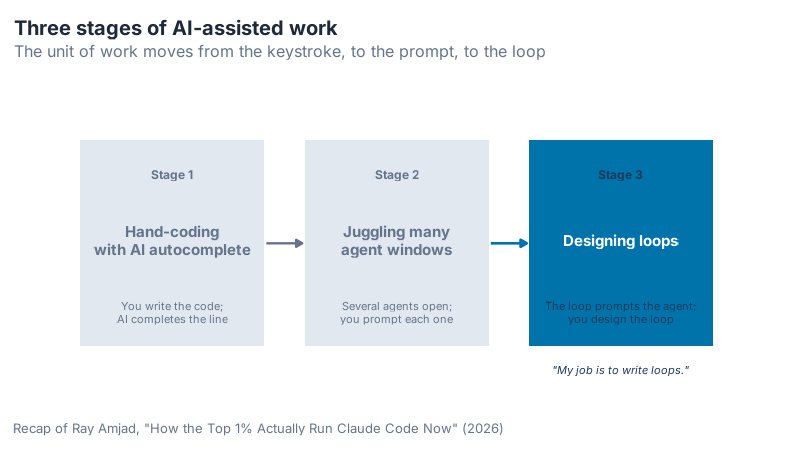
What jumped out to me here is the trap in stage two. It feels productive. Six windows, lots of motion, the sense of running a small agent army. But you’re still the bottleneck, because nothing happens unless you prompt it. The jump to stage three isn’t about more agents. It’s about removing yourself from the inner cycle.
Anatomy of a loop
So what is a loop, mechanically? Amjad breaks it into five parts.
A loop starts with a trigger. That can be a prompt you type, a time of day (every 24 hours), or an event at a data source (a new row, a new error). Then comes an action: the work itself, which might be a /goal run, an autoresearch routine, or a task broken into small pieces. Then a check: is it done? If not, the loop repeats. When it finishes, it surfaces the result somewhere you’ll see it, a Slack or Telegram message, a merged pull request, a folder of screen recordings.
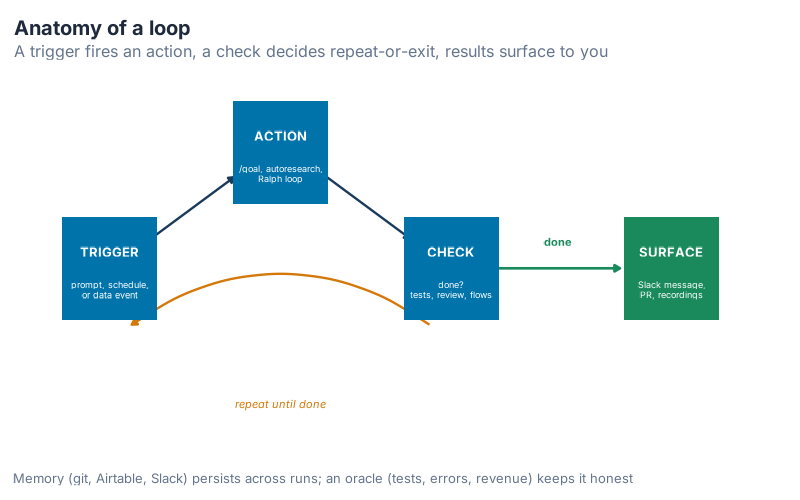
The surprise in this diagram is how little of it is new. Every piece already exists in how you work. The trigger is just "I decide to start." The check is just "I look at the output and judge it." Designing a loop means writing those judgments down so the machine can make them without you. When you design one, Amjad says, you decide the inputs (often a spec), the actions, the checks, where the memory lives, the exit condition, and the channel where results land. That list is the design.
You’re already running loops by hand
Here’s the part of the video that reframes everything. Think about how you ship a feature with an agent today.
You go back and forth on a spec. You tell the agent to implement it. You run a code review, the agent finds issues, you tell it to fix them, you review again. Maybe twice. Then you ask it to run the tests, open the page in a browser, record what it sees, and fix whatever broke. Finally you merge the pull request, then watch the error tracker for two minutes to see if anything spiked.
Look at what you just did. The code-review-and-fix cycle is a loop. The verify-and-fix cycle is a loop. You drove both of them by hand, prompt by prompt, in white text on a screen. In Amjad’s framing, you were the runtime for two nested loops the whole time.
Stage three wraps that entire process into one loop. The input is a spec you still write yourself, because you want to decide how the feature should look. The output is a merged pull request plus screen recordings that show the feature works. Everything in between, the reviews, the fixes, the browser tests, runs inside the loop without you typing each step.
This isn’t hypothetical. In the video, Amjad describes a single roughly 19-hour run that tested over 300 user flows, with an automatic screen recording of each one saved to a folder he could review later. He then ran a follow-up loop for about 11 hours that fixed the issues the first run had surfaced. (The video states the flow count twice, once as "over 500" and once as "over 300" for the same run; I’m using the conservative figure.) That long run used the /goal command rather than /loop.
Inner loops and outer loops
Once one loop runs reliably, you stack another on top. An outer loop generates work for an inner loop.
The inner loop from the last section implements a spec. An outer loop can produce the specs. Amjad’s example: a competitor-monitoring loop that checks rivals’ LinkedIn, X, and changelogs every day, notices a new feature, uses browser or computer use to click around and reverse-engineer how it works, then writes a spec for the same thing. A human approves the spec. Approval triggers the inner loop, which builds it. No approval, and it waits until tomorrow.
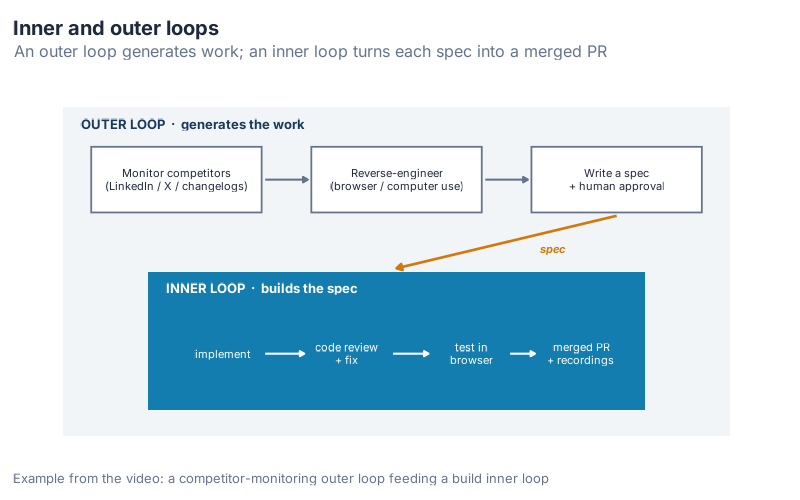
He gives two more pairs. One is an arXiv-monitoring outer loop that scans for new machine-learning strategies daily and feeds them to an inner optimization loop; when the inner loop beats your current approach by some margin, it pings you. The other is non-technical: a cold-email setup where the inner loop improves the copy on 10% of your list each day with a human in the loop, and a weekly outer loop monitors fake inboxes you’ve subscribed to competitors’ campaigns to see what they’re sending.
The pattern is the same every time. The outer loop decides what’s worth doing. The inner loop does it. The human sits at the approval gate, not in the typing seat.
Every loop is stateless, so every loop needs memory
A loop run starts from nothing. It doesn’t remember yesterday. That’s the catch, and it’s why memory matters.
Amjad lists three places to keep it. The first is the file system or git history. His daily loop that fixes error-tracker issues affecting more than 20 users knows what it already handled yesterday because it reads yesterday’s commits. The second is an external store like Airtable, connected to a scheduled routine, with an instruction telling the loop to check the table before acting so it doesn’t repeat itself.
The third is the one I’d steal first. He uses Slack channels as both a memory layer and a decision surface. One channel per loop. A bot posts the loop’s findings and recommendations. Amjad reads them, reacts to the option he wants with an emoji, and the next run reads his reaction and acts on it. The channel remembers (the messages are the history) and it’s where he makes the call (the emoji is the instruction). One surface does both jobs.
Memory compounds. So does slop.
Here’s the honest part of the video. Memory lets loops build on themselves over time, which is the whole point. It also lets the garbage build on itself. Bad output feeds the next run, which produces worse output, which feeds the run after that.
Amjad’s framing: entropy rises anyway, and agents, because they do so much work so fast, collapse a lot of that entropy into a short window. You face more mess per day than you did two years ago, not less. So you need brakes.
He names two. Inside the loop, run adversarial code reviews, which is exactly why the review and verification steps sit in the loop from earlier. Outside the loop, anchor it to an oracle the model can’t talk its way around: passing tests, real production errors, Stripe revenue, actual reply rates. A loop with no external oracle drifts. A loop tied to revenue or a green test suite stays honest, because reality votes.
The abstraction ladder
Cherny frames loops as the next rung on a ladder. We’ve been climbing it for 80 years.
Punch cards in the 1940s. Then assembly. Then high-level languages like C. Then libraries and frameworks like Rails and Next.js. Then prompts. Now loops, which run the prompts for us. As Cherny puts it in the video, you stop being the thing that runs; you design the thing that runs, and the leverage moves up a layer.
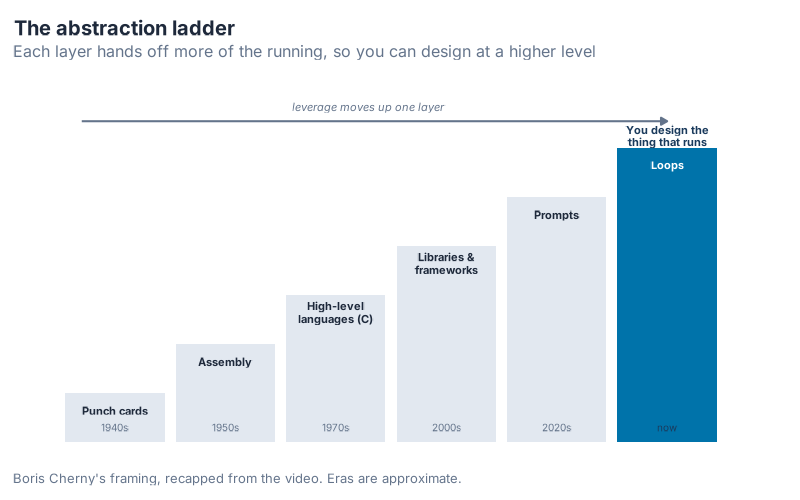
The thing that struck me about this ladder is that every rung felt like cheating to the people on the rung below. Assembly programmers thought C hid too much. Plenty of engineers still think frameworks make you soft. The pattern holds anyway. Each layer trades fine control for leverage, and the leverage wins. Loops are just the current top rung.
Where this is heading: loops that audit loops
The outlook section of the video points at meta loops. A loop whose job is to watch your other loops, see which ones move the bottom line and which ones don’t, and propose new loops to add, with your approval.
Amjad is careful here, and I appreciate the restraint. The models don’t yet have the taste to pick good loops on their own. Expect something like 10 to 20 recommendations, and expect to throw most of them out. The judgment is still yours. The generation is automated.
He also closes the loop on cost, which most of these conversations skip. Loops burn tokens. A lot of them. In the video he mentions a single run that used 4.1 million tokens, and his test for whether that’s fine is blunt: were the tokens economically valuable? If the work pays back more than the tokens cost, run it. If not, don’t. That’s the whole rule. It’s a refreshingly boring answer in a field full of hype.
This idea didn’t appear from nowhere, either. Amjad points to Andrej Karpathy’s "autoresearch" loop, which proposes a code change, scores it against a benchmark, keeps it if the metric improves, and reverts it if it gets worse, running hundreds of experiments unsupervised. Microsoft Research applied the same trick to agent skills rather than code in its "SkillOpt" work: edit a skill’s instructions, keep the edit only if it passes validation. Same loop, different target.
What this means for operations work
One bridge to the world this blog usually lives in, and this part is mine, not the video’s. The loop pattern outgrows coding fast. Any judgment you make on a schedule against a data source is a candidate.
Open purchase orders are a data source. A daily loop could scan every open PO, flag the ones where the promised date has slipped or the supplier has gone quiet, draft the chase email, and drop the shortlist into a channel where you approve with an emoji before anything sends. Trigger (every morning), action (scan and draft), check (does this PO actually need a nudge?), exit (nothing overdue), surface (your approvals channel). The oracle that keeps it honest is the one that matters most in procurement anyway: did the goods actually arrive? If you’ve ever spent the first hour of your day reading an exception report by hand, you’ve been the runtime for a loop you could have written down.
Interactive Dashboard
Explore the anatomy yourself. Pick a trigger, an action, a check, a memory store, an exit condition, and a surface channel, and the page assembles a readable loop spec from your choices. Leave out the memory or the oracle and it warns you about the two failure modes from the video: a stateless loop that forgets, and a loop with no external check that quietly fills with slop.
Interactive Dashboard
Explore the data yourself — adjust parameters and see the results update in real time.
Your next steps this week
Five concrete things, in order of effort.
- Inventory your manual loops. For two days, notice every time you prompt an agent, read its output, and prompt again toward the same goal. That back-and-forth is a loop you’re running by hand. Write down three of them.
- Turn one into a written loop. Pick the task you prompted an agent to do at least three times this month. Write it out as five lines: trigger, action, check, exit condition, surface. That document is the loop spec.
- Give it memory before you give it autonomy. Decide where state lives: git commits, an Airtable, or a single Slack channel where the bot posts and you react. Without this, every run starts amnesiac.
- Attach one oracle. Tie the loop to something outside the model that can tell it it’s wrong: a passing test suite, an error count, a real reply rate. No oracle, no loop.
- Do the token math before you scale. Run it once, read the token count, and ask Amjad’s question: did this pay for itself? Only loop what’s economically valuable.
Start with one loop. Get the trigger, check, and exit right on something small. The leverage compounds from there, and so does the mess if you skip the oracle.
Source & further watching
This post is a recap of Ray Amjad’s video "How the Top 1% Actually Run Claude Code Now" (published 2026-06-09). All operational figures (the 19-hour and 11-hour runs, the "more than 20 users" threshold, the 4.1 million tokens) come from that video and reflect Amjad’s own reports, not independently verified measurements. Watch the original for the full walkthrough and his on-screen examples.
Show R Code
The four conceptual diagrams above (the three stages, the loop anatomy, the inner/outer loop architecture, and the abstraction ladder) were generated in R with ggplot2 using the shared inphronesys theme. There’s no dataset here: each chart is hand-built from geom_rect, geom_segment, and labels. Full script below.
# =============================================================================
# generate_loops_images.R
# Conceptual diagrams for "Designing Loops That Prompt Your Agents"
# Educational recap of Ray Amjad's video (no dataset / no forecasting models).
# All charts are hand-built ggplot2 diagrams (geom_rect/segment/label/annotate).
#
# Run from project root:  Rscript Scripts/generate_loops_images.R
# Outputs (Images/, prefix loops_, max 800px wide, bg white, dpi 100):
#   loops_three_stages.png       (800x450)
#   loops_anatomy.png            (800x500)
#   loops_inner_outer.png        (800x500)
#   loops_abstraction_ladder.png (800x500)
# =============================================================================

source("Scripts/theme_inphronesys.R")

library(ggplot2)

# Ensure output dir exists
if (!dir.exists("Images")) dir.create("Images")

# Shared focus / de-emphasis colors
focus     <- iph_colors$blue
focus_dk  <- iph_colors$navy
muted      <- iph_colors$lightgrey
muted_txt  <- iph_colors$grey
ink        <- iph_colors$dark
accent     <- iph_colors$orange
good       <- iph_colors$green

# Small helper: rounded-ish flow box via geom_rect + centered label
flow_box <- function(xmin, xmax, ymin, ymax, fill, color = NA, alpha = 1) {
  annotate("rect", xmin = xmin, xmax = xmax, ymin = ymin, ymax = ymax,
           fill = fill, color = color, alpha = alpha, linewidth = 0.6)
}

# =============================================================================
# 1. THREE STAGES — evolution of AI-assisted work
#    autocomplete -> juggling agents -> designing loops
# =============================================================================
stages <- data.frame(
  x      = c(1, 2, 3),
  label  = c("Stage 1", "Stage 2", "Stage 3"),
  title  = c("Hand-coding\nwith AI autocomplete",
             "Juggling many\nagent windows",
             "Designing loops"),
  sub    = c("You write the code;\nAI completes the line",
             "Several agents open;\nyou prompt each one",
             "The loop prompts the agent;\nyou design the loop"),
  fill   = c(muted, muted, focus),
  txt    = c(muted_txt, muted_txt, "white"),
  subtxt = c(muted_txt, muted_txt, focus_dk)
)

p1 <- ggplot(stages) +
  # connecting arrows between stages
  annotate("segment", x = 1.42, xend = 1.58, y = 2, yend = 2,
           arrow = arrow(length = unit(0.18, "cm"), type = "closed"),
           color = muted_txt, linewidth = 0.8) +
  annotate("segment", x = 2.42, xend = 2.58, y = 2, yend = 2,
           arrow = arrow(length = unit(0.18, "cm"), type = "closed"),
           color = focus, linewidth = 0.9) +
  geom_tile(aes(x = x, y = 2, fill = I(fill)),
            width = 0.82, height = 1.5, color = NA) +
  geom_text(aes(x = x, y = 2.5, label = label, color = I(subtxt)),
            family = "Inter", fontface = "bold", size = 3.2) +
  geom_text(aes(x = x, y = 2.02, label = title, color = I(txt)),
            family = "Inter", fontface = "bold", size = 3.9, lineheight = 0.95) +
  geom_text(aes(x = x, y = 1.5, label = sub, color = I(subtxt)),
            family = "Inter", size = 2.9, lineheight = 0.95) +
  annotate("text", x = 3, y = 1.08, label = '"My job is to write loops."',
           family = "Inter", fontface = "italic", size = 3, color = focus_dk) +
  scale_x_continuous(limits = c(0.45, 3.55)) +
  scale_y_continuous(limits = c(0.9, 3.1)) +
  labs(title = "Three stages of AI-assisted work",
       subtitle = "The unit of work moves from the keystroke, to the prompt, to the loop",
       caption = "Recap of Ray Amjad, \"How the Top 1% Actually Run Claude Code Now\" (2026)") +
  theme_inphronesys(grid = "none") +
  theme(axis.title = element_blank(), axis.text = element_blank())

ggsave("https://inphronesys.com/wp-content/uploads/2026/06/loops_three_stages.png", p1,
       width = 8, height = 4.5, dpi = 100, bg = "white")

# =============================================================================
# 2. LOOP ANATOMY — trigger -> action -> check -> (repeat) -> surface
#    Circular cycle with a "repeat" arrow back, plus an exit to "surface".
# =============================================================================
# Place 3 core nodes on an arc; surface node off to the right.
nodes <- data.frame(
  id    = c("trigger", "action", "check", "surface"),
  label = c("TRIGGER", "ACTION", "CHECK", "SURFACE"),
  sub   = c("prompt, schedule,\nor data event",
            "/goal, autoresearch,\nRalph loop",
            "done?\ntests, review, flows",
            "Slack message,\nPR, recordings"),
  x     = c(1.0, 2.4, 3.8, 5.6),
  y     = c(2.0, 2.7, 2.0, 2.0),
  fill  = c(focus, focus, focus, good)
)

p2 <- ggplot(nodes) +
  # forward arrows trigger->action->check
  annotate("segment", x = 1.34, xend = 2.02, y = 2.18, yend = 2.55,
           arrow = arrow(length = unit(0.16, "cm"), type = "closed"),
           color = focus_dk, linewidth = 0.8) +
  annotate("segment", x = 2.78, xend = 3.46, y = 2.55, yend = 2.18,
           arrow = arrow(length = unit(0.16, "cm"), type = "closed"),
           color = focus_dk, linewidth = 0.8) +
  # repeat arrow: check -> trigger (curved back, "not done")
  annotate("curve", x = 3.62, xend = 1.18, y = 1.66, yend = 1.66,
           curvature = 0.35, arrow = arrow(length = unit(0.16, "cm"),
           type = "closed"), color = accent, linewidth = 0.8) +
  annotate("text", x = 2.4, y = 1.18, label = "repeat until done",
           family = "Inter", fontface = "italic", size = 3, color = accent) +
  # exit arrow: check -> surface ("done")
  annotate("segment", x = 4.16, xend = 5.18, y = 2.0, yend = 2.0,
           arrow = arrow(length = unit(0.16, "cm"), type = "closed"),
           color = good, linewidth = 0.9) +
  annotate("text", x = 4.67, y = 2.16, label = "done",
           family = "Inter", fontface = "bold", size = 2.9, color = good) +
  # nodes
  geom_tile(aes(x = x, y = y, fill = I(fill)),
            width = 0.78, height = 0.62, color = NA) +
  geom_text(aes(x = x, y = y + 0.10, label = label),
            family = "Inter", fontface = "bold", color = "white", size = 3.5) +
  geom_text(aes(x = x, y = y - 0.13, label = sub),
            family = "Inter", color = "white", size = 2.45, lineheight = 0.9) +
  scale_x_continuous(limits = c(0.5, 6.2)) +
  scale_y_continuous(limits = c(0.95, 3.05)) +
  labs(title = "Anatomy of a loop",
       subtitle = "A trigger fires an action, a check decides repeat-or-exit, results surface to you",
       caption = "Memory (git, Airtable, Slack) persists across runs; an oracle (tests, errors, revenue) keeps it honest") +
  theme_inphronesys(grid = "none") +
  theme(axis.title = element_blank(), axis.text = element_blank())

ggsave("https://inphronesys.com/wp-content/uploads/2026/06/loops_anatomy.png", p2,
       width = 8, height = 5, dpi = 100, bg = "white")

# =============================================================================
# 3. INNER vs OUTER LOOP — outer loop feeds specs to inner loop
#    Nested boxes via geom_rect + arrows.
# =============================================================================
p3 <- ggplot() +
  # OUTER loop container
  flow_box(0.3, 9.7, 0.5, 5.5, fill = muted, alpha = 0.45) +
  annotate("text", x = 0.55, y = 5.25, label = "OUTER LOOP  ·  generates the work",
           family = "Inter", fontface = "bold", size = 3.4,
           color = focus_dk, hjust = 0) +
  # outer-loop steps (top row)
  flow_box(0.7, 3.1, 3.9, 4.9, fill = "white", color = muted_txt) +
  annotate("text", x = 1.9, y = 4.4, label = "Monitor competitors\n(LinkedIn / X / changelogs)",
           family = "Inter", size = 2.8, color = ink, lineheight = 0.95) +
  flow_box(3.8, 6.2, 3.9, 4.9, fill = "white", color = muted_txt) +
  annotate("text", x = 5.0, y = 4.4, label = "Reverse-engineer\n(browser / computer use)",
           family = "Inter", size = 2.8, color = ink, lineheight = 0.95) +
  flow_box(6.9, 9.3, 3.9, 4.9, fill = "white", color = muted_txt) +
  annotate("text", x = 8.1, y = 4.4, label = "Write a spec\n+ human approval",
           family = "Inter", size = 2.8, color = ink, lineheight = 0.95) +
  annotate("segment", x = 3.15, xend = 3.75, y = 4.4, yend = 4.4,
           arrow = arrow(length = unit(0.14, "cm"), type = "closed"),
           color = muted_txt, linewidth = 0.7) +
  annotate("segment", x = 6.25, xend = 6.85, y = 4.4, yend = 4.4,
           arrow = arrow(length = unit(0.14, "cm"), type = "closed"),
           color = muted_txt, linewidth = 0.7) +
  # spec handed down to inner loop
  annotate("segment", x = 8.1, xend = 5.0, y = 3.85, yend = 3.05,
           arrow = arrow(length = unit(0.16, "cm"), type = "closed"),
           color = accent, linewidth = 0.9) +
  annotate("text", x = 7.2, y = 3.35, label = "spec",
           family = "Inter", fontface = "bold.italic", size = 3, color = accent) +
  # INNER loop container
  flow_box(1.5, 8.5, 0.9, 3.0, fill = focus, alpha = 0.92) +
  annotate("text", x = 1.75, y = 2.75, label = "INNER LOOP  ·  builds the spec",
           family = "Inter", fontface = "bold", size = 3.4,
           color = "white", hjust = 0) +
  # inner steps
  annotate("text", x = 2.55, y = 1.75, label = "implement",
           family = "Inter", size = 2.9, color = "white") +
  annotate("text", x = 4.3, y = 1.75, label = "code review\n+ fix",
           family = "Inter", size = 2.9, color = "white", lineheight = 0.9) +
  annotate("text", x = 6.05, y = 1.75, label = "test in\nbrowser",
           family = "Inter", size = 2.9, color = "white", lineheight = 0.9) +
  annotate("text", x = 7.6, y = 1.75, label = "merged PR\n+ recordings",
           family = "Inter", size = 2.9, color = "white", lineheight = 0.9) +
  annotate("segment", x = 3.15, xend = 3.7, y = 1.75, yend = 1.75,
           arrow = arrow(length = unit(0.13, "cm"), type = "closed"),
           color = "white", linewidth = 0.7) +
  annotate("segment", x = 4.95, xend = 5.45, y = 1.75, yend = 1.75,
           arrow = arrow(length = unit(0.13, "cm"), type = "closed"),
           color = "white", linewidth = 0.7) +
  annotate("segment", x = 6.6, xend = 6.95, y = 1.75, yend = 1.75,
           arrow = arrow(length = unit(0.13, "cm"), type = "closed"),
           color = "white", linewidth = 0.7) +
  scale_x_continuous(limits = c(0.1, 9.9)) +
  scale_y_continuous(limits = c(0.4, 5.7)) +
  labs(title = "Inner and outer loops",
       subtitle = "An outer loop generates work; an inner loop turns each spec into a merged PR",
       caption = "Example from the video: a competitor-monitoring outer loop feeding a build inner loop") +
  theme_inphronesys(grid = "none") +
  theme(axis.title = element_blank(), axis.text = element_blank())

ggsave("https://inphronesys.com/wp-content/uploads/2026/06/loops_inner_outer.png", p3,
       width = 8, height = 5, dpi = 100, bg = "white")

# =============================================================================
# 4. ABSTRACTION LADDER — punch cards -> assembly -> C -> frameworks -> prompts -> loops
#    Stepped stair chart; each rung higher = more leverage. Loops highlighted.
# =============================================================================
ladder <- data.frame(
  step  = 1:6,
  label = c("Punch cards", "Assembly", "High-level\nlanguages (C)",
            "Libraries &\nframeworks", "Prompts", "Loops"),
  era   = c("1940s", "1950s", "1970s", "2000s", "2020s", "now")
)
ladder$is_loop <- ladder$step == 6
ladder$fill    <- ifelse(ladder$is_loop, focus, muted)
ladder$txt     <- ifelse(ladder$is_loop, "white", ink)
ladder$ertxt   <- ifelse(ladder$is_loop, focus_dk, muted_txt)

bw <- 0.9  # bar width

p4 <- ggplot(ladder) +
  # stair treads (rectangles rising left -> right)
  geom_rect(aes(xmin = step - bw/2, xmax = step + bw/2,
                ymin = 0, ymax = step, fill = I(fill))) +
  # rung label inside/atop each tread
  geom_text(aes(x = step, y = step - 0.35, label = label, color = I(txt)),
            family = "Inter", fontface = "bold", size = 3.0, lineheight = 0.9) +
  geom_text(aes(x = step, y = 0.3, label = era, color = I(ertxt)),
            family = "Inter", size = 2.7) +
  # leverage arrow rising along the top
  annotate("segment", x = 0.7, xend = 6.0, y = 6.55, yend = 6.55,
           arrow = arrow(length = unit(0.18, "cm"), type = "closed"),
           color = muted_txt, linewidth = 0.7) +
  annotate("text", x = 3.3, y = 6.85, label = "leverage moves up one layer",
           family = "Inter", fontface = "italic", size = 3, color = muted_txt) +
  annotate("text", x = 6, y = 6.25,
           label = "You design the\nthing that runs",
           family = "Inter", fontface = "bold", size = 2.9,
           color = focus_dk, lineheight = 0.9) +
  scale_x_continuous(limits = c(0.4, 6.7)) +
  scale_y_continuous(limits = c(0, 7.1)) +
  labs(title = "The abstraction ladder",
       subtitle = "Each layer hands off more of the running, so you can design at a higher level",
       caption = "Boris Cherny's framing, recapped from the video. Eras are approximate.") +
  theme_inphronesys(grid = "none") +
  theme(axis.title = element_blank(), axis.text = element_blank())

ggsave("https://inphronesys.com/wp-content/uploads/2026/06/loops_abstraction_ladder.png", p4,
       width = 8, height = 5, dpi = 100, bg = "white")

cat("Done. Wrote 4 PNGs to Images/ with prefix loops_\n")
References
- Ray Amjad, "How the Top 1% Actually Run Claude Code Now," YouTube, 2026-06-09. https://www.youtube.com/watch?v=2-0lxK2wgJ8
- Boris Cherny, on
/loopin Claude Code, X (Twitter). https://x.com/bcherny/status/2030193932404150413 - Boris Cherny, on
/loopand/schedule, X (Twitter). https://x.com/bcherny/status/2038454341884154269 - "I Now Just Write Loops To Prompt Claude Code: Claude Code Creator Boris Cherny," OfficeChai. https://officechai.com/ai/i-now-just-write-loops-to-prompt-claude-code-claude-code-creator-boris-cherny/
- "Andrej Karpathy’s 630-line Python script ran 50 experiments overnight without any human input," The New Stack. https://thenewstack.io/karpathy-autonomous-experiment-loop/
- Microsoft Research, "SkillOpt: Executive Strategy for Self-Evolving Agent Skills," 2026. https://www.microsoft.com/en-us/research/publication/skillopt-executive-strategy-for-self-evolving-agent-skills/
Leave a Reply